Mysql
Mysql Relearn
内存模型:
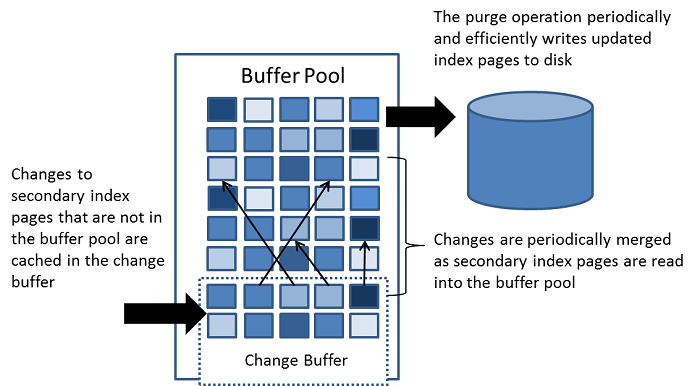
- Change BUffer: 缓存 不在Buffer pool 中的 索引页的变动, 变动 可能由 insert update, delete 等操作 导致, 将在以后 页面 被加载到 Buffer pool时 被合并
- 不同于 聚簇索引, 普通的索引 通常是不唯一的,索引 的插入 删除 更新 通常是 random 的, 随后 将 change Buffer 的合并到 Buffer pool(当索引页被load 到 buffer pool时) 将减少 随机 的IO 操作。
- 当系统 空闲时,或者缓慢关闭时 会定时的进行清理操作(将cache 写回到 硬盘中) 清理操作 将 一系列的 索引更新 写入到磁盘中 的速度 远高于 每个更新立即写入
- 当存在大量的 受影响的row 和 众多的 索引时, change Buffer 的合并(这里的合并 应该不是简单的与 Buffer pool的合并,而是 合并之后,需要写回到 硬盘中吧) 可能 需要数个小时, 在这期间, IO将显著增加, 导致 磁盘绑定查询(意思是 需要 访问硬盘?) 的速度显著变慢,
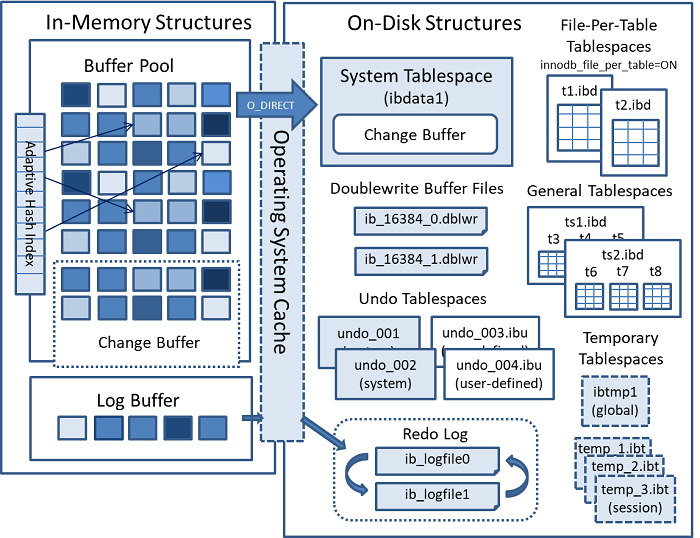
- 在Memory中, change buff 是Buffer pool 的一部分, 在disk上, change buff 是 system tablespace 的一部分(当服务器关闭是, 索引的更改change buff 可能保存其中)
- 配置:
- innodb_change_buffering 因为 change buffer 虽然能够 减少IO操作,但 依然占用了 部分的 Buffer pool, 所以提供了此变量 来精确的控制 insert, delete, purge(physical deletion happen in background), changes(insert + delete) 操作 是否使用 change buffer
- innodb_change_buffer_max_size 可以控制 buffer的大小,数值为 其所占 Buffer pool 的百分比, 默认为 25,最高 为 50
- Monitor:
- show engine Innodb status 中的 INSERT BUFFER AND ADAPTIVE HASH INDEX 段
1
2
3
4
5
6
7
8
9
10
11
  -------------------------------------
  INSERT BUFFER AND ADAPTIVE HASH INDEX
  -------------------------------------
  Ibuf: size 1, free list len 0, seg size 2, 0 merges
  merged operations:
   insert 0, delete mark 0, delete 0
  discarded operations:
   insert 0, delete mark 0, delete 0
  Hash table size 4425293, used cells 32, node heap has 1 buffer(s)
  13577.57 hash searches/s, 202.47 non-hash searches/s
- 数据库方式: information_schema 中 相关的table 可以查询到相关信息 url
自适应Hash 索引:
- Hash 索引: 通过 索引 的前缀 构建 hash 的 key, 通过监控到的搜索, 如果InnoDB 认为可以 让查询从 简历Hash索引中 收益, 他会自动构建。
- 在一些负载比较繁重的情况下, 导致 监控 争用 Hash索引 的开销 并不能够 使其 受益,则可以选择关闭 该选项, 以为很难判定 这种情况的出现, 则 应该使用 准确的基准测试 之后来决定
- 自适应 Hash索引: 已经实现了 分区(partition), 每个索引都绑定到特定的分区(并不知道有啥用,这里要讲啥?) 分区数量由 innodb_adaptive_hash_index_parts 控制,在 8…512 范围内
- 可以 在 show engine innodb status 中的 SEMAPHORES 段 来查看 btr0sea.c 的rw 锁 争用情况, 可以考虑增加 Hash索引的分区数值,或者关闭 该功能
Log Buffer:
- Log buffer 用来缓存 将要写入 disk 的 log file的数据,
- 配置:
- innodb_log_buffer_size 用来控制Buffer 的大小, default is 16MB, 定期 刷新到 disk, 一个大 的 log buffer 可以让一个 da的 transaction 在commit 提交前 不需要将 redo log 刷新到disk 中。
- innodb_flush_log_at_trx_commit 控制 log buffer 而如何 同步到disk中
- innodb_flush_log_at_timeout: 控制log buffer 同步的频率
InnoDB 磁盘数据结构:
Table
创建表: create table,
1
   CREATE TABLE t1 (a INT, b CHAR (20), PRIMARY KEY (a)) ENGINE=InnoDB;
- Innodb 默认 table 的存储方式 为一个 文件 一个table, 配置 innodb_file_per_table 用来打开、关闭 此行为
Row format:
- row 的格式,决定了 InnoDB 行 在物理上的disk 的存储,支持 4中format, 每个格式 都有对应的存储特性。格式有:
- redundant: 冗余
- compact: 紧凑
- dynamic: 动态
- compressed: 压缩
- row 格式控制: 默认为 dynamic, 变量 innodb_default_row_format 可以控制 默认的row 存储格式, create table, alter table 也同样可以控制 row 格式
Primary key
建议 为每个table 创建自己的 primary key, 选取 primary key 的column 规则为:
- 重要查询所使用
- 永远不会存储空
- 永远不会存储重复数值
- 插入之后 很少更新的数值
- 如果没有 明显的选择的话, 则 可以创建一个 type 为number auto-increment 的column 作为主建
- 尽管在没有定义主键的情况下表可以正常工作,但是主键涉及性能的许多方面,并且对于任何大型或经常使用的表都是至关重要的设计方面。 建议始终在CREATE TABLE语句中指定主键
- 查看table的相关的属性:
- SHOW TABLE STATUS
1
2
3
4
5
6
7
8
9
10
11
12
13
14
15
16
17
18
19
20
   mysql> SHOW TABLE STATUS FROM test LIKE 't%' \G;
   *************************** 1. row ***************************
              Name: t1
            Engine: InnoDB
           Version: 10
        Row_format: Dynamic
              Rows: 0
    Avg_row_length: 0
       Data_length: 16384
   Max_data_length: 0
      Index_length: 0
         Data_free: 0
    Auto_increment: NULL
       Create_time: 2021-02-18 12:18:28
       Update_time: NULL
        Check_time: NULL
         Collation: utf8mb4_0900_ai_ci
          Checksum: NULL
    Create_options:
           Comment:
从 INFORMATION_SCHEMA.INNODB_TABLES 中获取信息:
1
2
3
4
5
6
7
8
9
10
11
12

  mysql> SELECT * FROM INFORMATION_SCHEMA.INNODB_TABLES WHERE NAME='test/t1' \G
 *************************** 1. row ***************************
      TABLE_ID: 1144
          NAME: test/t1
          FLAG: 33
        N_COLS: 5
         SPACE: 30
    ROW_FORMAT: Dynamic
 ZIP_PAGE_SIZE: 0
    SPACE_TYPE: Single
  INSTANT_COLS: 0
在其他目录中存储 数据:(即 外部创建表)
- Using the DATA DIRECTORY Clause: 在 create table syntax 中 可以 添加 DATA DIRECTORY 来制定数据的存储目录
- Using TABLESPACE Clause: 在create table syntax 中添加 TABLESPACE = innodb_file_per_table 配合 data dictory 使用
示例:
1
2
3
4
5
6
7
8
9
10
11
mysql> USE test;
Database changed

mysql> CREATE TABLE t1 (c1 INT PRIMARY KEY) DATA DIRECTORY = '/external/directory';

# MySQL creates the table's data file in a schema directory
# under the external directory

shell> cd /external/directory/test
shell> ls
t1.ibd
导入 InnoDB 表:
- 可能应用的场景有:
- 利用 线上 的数据做报表,而不像 增加额外的负担 在线上 2) 复制数据给 replica server 3) 从backup 上恢复 表 4)
- 比import a dump file 更快的 移动数据 的方法
- 先决条件
- innodb_file_per_table 变量 必须是打开的
- source server & desitnation server 的 page size of tablespace 配置必须相同, innodb_page_size 变量控制
- foreign key 的关系, 如果 导出表 有 foreign key, 在 执行 discard talbespace 之前, 则 需要 foreign_key_checks 需要关闭, 还需要导出所有外键 关联的表,因为ALTER TABLE … IMPORT TABLESPACE不会对导入的数据实施外键约束。 为此 需要 停止更新 相关的表, 提交所有 transaction, 获取表 的 S锁,然后执行 export 操作
- 导出导入 的mysql version 必须兼容
- 导出导入server 的 data directory 必须 相同, 导致 schema mismatch error
- 导出导入server 的 ROW_FORMAT 需要相同, 导致 schema mismatch errorgg
- 示例
在 destination server 上 创建表, schema 需要与 source server 表的 syntax 相同
1
2
3
 mysql> USE test;
 mysql> CREATE TABLE t1 (c1 INT) ENGINE=INNODB;
- 在destination server 上, 执行 discard tablespace 命令
- table 将会 上 X 锁
tablespace 与table 分离
1
 mysql> ALTER TABLE t1 DISCARD TABLESPACE;
- 在source server 上 执行 flush tables … for export, 执行之后 只能允许 读表请求, 将产生 .cfg, .ibd文件
- 导出的table 将会上S锁, 并将更新 flush 到disk
- 停止 purge thread
- Dirty page sync to disk
table metadata write to .cfg file
1
2
3
4
5
6
7
8
 mysql> USE test;
 mysql> FLUSH TABLES t1 FOR EXPORT;

 # 可能看到的 输出为
 [Note] InnoDB: Sync to disk of '"test"."t1"' started.
 [Note] InnoDB: Stopping purge
 [Note] InnoDB: Writing table metadata to './test/t1.cfg'
 [Note] InnoDB: Table '"test"."t1"' flushed to disk
复制数据:
1
 shell> scp /path/to/datadir/test/t1.{ibd,cfg} destination-server:/path/to/datadir/test
- 在 source server 上执行 unlock tables
- 删除 .cfg 文件
- table上的S锁 被释放
- purge thread 被重启
1
2
3
4
5
6
  mysql> USE test;
  mysql> UNLOCK TABLES;

  # 可能的输出log为
  [Note] InnoDB: Deleting the meta-data file './test/t1.cfg'
  [Note] InnoDB: Resuming purge
- 在 destination server 上import tablespace
- 每个 tablespace page 会被 校验是否正确
- The space ID and log sequence numbers (LSNs) on each page are updated.
- Flags are validated and LSN updated for the header page.
- Btree pages are updated.
The page state is set to dirty so that it is written to disk.
1
2
3
4
5
6
7
8
9
10
11
12
 mysql> USE test;
 mysql> ALTER TABLE t1 IMPORT TABLESPACE;

 # 可能输出 log 为:

 [Note] InnoDB: Importing tablespace for table 'test/t1' that was exported
 from host 'host_name'
 [Note] InnoDB: Phase I - Update all pages
 [Note] InnoDB: Sync to disk
 [Note] InnoDB: Sync to disk - done!
 [Note] InnoDB: Phase III - Flush changes to disk
 [Note] InnoDB: Phase IV - Flush complete
AUTO_INCREMENT 在InnoDB 中的处理方式
- 在表中 添加 AUTO_INCREMENT 字段, 是InnoDB 提高性能 与 稳定性的一种方式, 为了有效利用 AUTO_INCREMENT , 必须将 AUTO_INCREMENT 字段设为索引, 以便 执行 select max(col) 以获得 最大值,
- AUTO_INCREMENT 锁的 集中方式,其中的区别 以及 每种对 replic 的影响
- 数据插入的集中方式: 所有生成 新row的 语句, 包括 insert, insert .. select, replace, replace .. select, load data 包含
- simple-insert: 可以预先知道 插入 行数 的 insert 语句,比如简单的单行, 多行 insert
- bulk-insert: 插入行数未知 的语句,比如: insert .. select ,replace .. select, load data 语句
- mixed-mode insert: 指定 auto_increment 数值的 insert 语句 或者 INSERT … ON DUPLICATE KEY UPDATE 等复杂的 语句,这些语句可能不会使用 auto_increment 分配的数值 比如:
1
   INSERT INTO t1 (c1,c2) VALUES (1,'a'), (NULL,'b'), (5,'c'), (NULL,'d');
- innodb_autoinc_lock_mode 可能的模式有: 0 (traditional), 1(consecutive), 2(interleaved) Mysql 8.0 默认为 interleaved 模式, 8.0 之前 默认为 consecutive 模式
lock mode 的变化 反映了 Mysql 从 基于语句 replica 转变到 基于 row replica 的转变。 基于语句复制 需要 一个 consecutive 的lock mode 来确保 auto-increment 数值的 可以预测 可重复 性 (因为 在replic时候, 同步的是 sql 执行语句,只有这样才能够保证 replic与 master server 的数据一致性), 而基于 row replica 对于 语句的执行顺序并不敏感
- traditional: 该种模式下, 所有的inert like 语句 斗殴需要获取 一个特殊的 table-level auto-inc lock, 该锁 需要把持到 语句的结束(非 transaction 结束) 来 保证 auto-increment 数值 的可重复性 与 可预见性, 同时保证了 auto-increment 字段数值的 连续性。 假设在 基于 语句 的复制模式中, 这意味着 sql语句 replic 到 replica server上的时候,将产生 与 source server上 完全相同的数值。 如果 让 多个 insert 语句 交替执行,则将导致 结果 不可重现, 即 replica server 与 source server数据 并不相同。 下面示例:
1
2
3
4
5
6
7
8
9
10
11
12
  CREATE TABLE t1 (
    c1 INT(11) NOT NULL AUTO_INCREMENT,
    c2 VARCHAR(10) DEFAULT NULL,
    PRIMARY KEY (c1)
  ) ENGINE=InnoDB;

  # ----------
  Tx1: INSERT INTO t1 (c2) SELECT 1000 rows from another table ...
  Tx2: INSERT INTO t1 (c2) VALUES ('xxx');


  # InnoDB 并不能知道 Tx1 中到底有多少数据 需要插入, 使用 一个 table-level 的lock ,可以 使 在同一时间 只执行 一个 sql 语句。 所以 当在 replica server 上 使用 基于  binary log 重放 sql 语句时候,无论是Tx1 与 Tx2 谁先执行, 都会产生相同的结果。当然 一个table-level的lock 必然会限制 并发 与 可伸缩性 的发挥
- consecutive mode: 在该种模式下,
- “bulk inserts” 使用特殊的 AUTO-INC table level lock 并一直把持到 语句的最后。该类规则将 应用到 所有 的 insert ..select, replace .. select, load data 的语句中,同一时间 只有 一个把持 AUTO-INC 的语句 能够执行,
- “simple inserts”: 因为可以预先知道插入的数量, 可以使用 特殊的 轻量级 X锁(只在auto-increment 分配阶段 保持),来避免 table-level AUTO-INC 锁。如果存在 其他的 transaction 持有 table-level 的 AUTO-INC lock 则 需要等待 该 transaction 完成
”mixed-mode inserts“: 分配的数值增量 要大于 插入的行数, 自动分配的数值 也是连续的。
- 简单的说, consecutive lock mode 下, 在 保证 基于语句的 replic 正确下,提高了 并发与可伸缩性, 完美兼容 tranditional mode
interleaved mode: 不使用 table-level auto-inc lock, 而且可以同时执行多个insert 语句, 是最快的,可伸缩 的 lock 模式, 但是对于 基于语句 复制的 server来说 并不安全。 在这种锁定模式下,保证auto-increment column 是唯一的,并且在所有同时执行的“类似INSERT”语句中单调递增。 但是,由于多个语句可以同时生成数字(也就是说,在语句之间交错分配数字),因此为任何给定语句插入的行生成的值可能不是连续的。即: 在 simple insert 语句中, auto-increment 中的column是连续的, mixed-mode insert 与 bulk insert 中 可能存在 gap
- auto-increment gap: 自动增量间隙
- 在所有的lock mode下: 如果事务发生回滚,则分配给该 transaction 的数值 就丢失了,该值 将不会被重用,因为表中的 auto-increment column 数值 可能存在 gap
- 批量插入: 在 traditional 或者 consecutive 模式下 任何插入 都不会产生 gap,因为批量插入 都需要获得 table-level 的 auto-inr lock 并保持到 活动结束。 在 interleaved 下,”bulk-insert” 可能产生gap。在 consecutive 或者 interleaved 模式下, 在连续的语句之间可能会出现gap,因为对于批量插入,可能不知道每个语句所需的自动递增值的确切数量,并且可能会高估。( 这里面 是不是描述有问题? 因为已经在前面说了, tranditional or consecutive 模式下 批量插入并不会产生gap, 这里又说会有, 为什么? 文档在此)
- mixed mode insert 在各种不同mode下产生的结果: 最近产生的sequence number is 100:
1
2
3
4
5
6
7
8
9
10
11
12
13
14
15
16
17
18
19
20
21
22
23
24
25
26
27
28
29
30
31
32
33
34
35
36
37
38
39
40
41
42
43
44
    mysql> CREATE TABLE t1 (
    -> c1 INT UNSIGNED NOT NULL AUTO_INCREMENT PRIMARY KEY,
    -> c2 CHAR(1)
    -> ) ENGINE = INNODB;

    mysql> INSERT INTO t1 (c1,c2) VALUES (1,'a'), (NULL,'b'), (5,'c'), (NULL,'d');

    # lock mode 为 traditional 时候, 执行插入操作
    mysql> SELECT c1, c2 FROM t1 ORDER BY c2;
     +-----+------+
     | c1  | c2   |
     +-----+------+
     |   1 | a    |
     | 101 | b    |
     |   5 | c    |
     | 102 | d    |
     +-----+------+

    # lock mode 为 consecutive 时候, 执行插入操作

        mysql> SELECT c1, c2 FROM t1 ORDER BY c2;
    +-----+------+
    | c1  | c2   |
    +-----+------+
    |   1 | a    |
    | 101 | b    |
    |   5 | c    |
    | 102 | d    |
    +-----+------+


    # lock mode 为 interleaved 时候, 执行插入操作

     mysql> SELECT c1, c2 FROM t1 ORDER BY c2;
     +-----+------+
     | c1  | c2   |
     +-----+------+
     |   1 | a    |
     |   x | b    |
     |   5 | c    |
     |   y | d    |
     +-----+------+

     x y 代表 唯一,但是并不能够确定的数值
InnoDB AUTO_INCREMENT Counter 的初始化:
- mysql 5.7 auto-increment 的counter 存储在 main memory not disk, 所以 当server 重启,将执行 类似 SELECT MAX(ai_col) FROM table_name FOR UPDATE; 来 进行 counter 的初始化
- MySQL 8.0 之后,行为发生了改变, 目前最大的 auto-increment counter 数值 被写入到了 redo log, server 重启直接从 disk 进行初始化counter
- 所以, 5.7 之后,如果transaction 发生rollback之后,重启server, 会出现rollback的 auto-increment id 被重复使用的问题,而 8.0 的server,则不会 重用 id, 因为 其将 counter 写入到了 disk中
- auto_increment_increment 设定 auto-increment 的起始点, 默认为1, auto_increment_increment 设置 增量 默认为 1
index: 没个 InnoDB 表, 都有一个 特殊的index 称为 聚簇索引, 用来保存 row data, 通常 聚簇索引 与 primary key(主键) 同意, 为了 请求获得 更好的性能, 理解 InnoDB 如何使用 聚簇索引 来 进行优化 查询,和 DML 操作 是非常重要 的
- 当你定义table 的Primary key时, InnoDB 用它作为聚簇索引, 如果没有 逻辑上的 唯一 非空 作为主键的情况下, 可以添加一个 auto-increment column 作为 主键
- 如果没有为 table 设定 Primary key( 主键) 时, InnoDB 使用第一个 Unique & 所有column not null 的index 作为聚簇索引
如果table 没有 Primary key 和 合适的Unique index, 则 InnoDB 生成一个隐藏的名称为 GEN_CLUST_INDEX 的聚簇索引, 该字段为 6-byte 的单调递增
- 聚簇索引 如何 加快查询:
Accessing a row through the clustered index is fast because the index search leads directly to the page that contains the row data. If a table is large, the clustered index architecture often saves a disk I/O operation when compared to storage organizations that store row data using a different page from the index record.
- 二级索引 是如何关联到 聚簇索引的: 二级索引定义为: 除 聚簇索引之外的索引
- 二级索引的每个条目(记录) 中 都包含 主键 + 二级索引 包含的column,InnoDB 使用 包含的主键 来 在聚簇索引中进行查找
所以 如果聚簇索引 很大的话,将加大 二级索引 的空间占用
- InnoDB index 的物理结构:
- InnoDB 所以为B-tree, 索引记录 存储在 B-tree 的 页子 page 中, 默认的 index page 大小为 16KB, 可以通过 innodb_page_size 进行设定
- 当插入 新纪录 到 聚簇索引时, InnoDB 尝试留下 1/16 的 空间 来满足 未来的insert update。 如果数据时按照 顺序插入的,则 index page 将占用 15/16 空间, 如果数据按照 random 顺序插入的,则可能 占用 1/2 - 15/16, innodb_fill_factor 用来控制 空间占用百分比
如果InnoDB 索引页的占用率下降到 MERGE_THRESHOLD(默认为50%) 时, InnoDB 将尝试 收缩索引 以 释放页面
- Sorted index builde
The System Tablespace:
- change buffer 在 disk 上存储到 system tablespace, 如果在system tablespace 而非 file-per-table 或者 general tablespace 则 其中还包含 table 和 index data的数据。 8.0之前 还存储 doublewrite buffer, innodb data dictionary, 8.0之后 则分开存储
- system tablespace 可以有多个 data 文件, 默认的 一个 ibddata1 在 data directory中,
- tablespace 的数量 与 大小 在 启动项 innodb_data_file_path 进行设定
- 可以进行调整,文档在此
File-Per-Table Tablespace: 包含 table中的 data 和 index,存储在系统中 单个文件中
- innodb_file_per_table 控制开关, 默认为 打开状态。关闭将导致 InnoDB 存储table 数据到 system tablespace 中
file-per-table tablespace 在mysql 的 data directory(DATA DIRECTORY 可以在create table syntax 中指定) 目录下 存储 table_name.idb ,下面为示例:
1
2
3
4
5
6
7
8
9
10
mysql> USE test;

mysql> CREATE TABLE t1 (
   id INT PRIMARY KEY AUTO_INCREMENT,
   name VARCHAR(100)
 ) ENGINE = InnoDB;

shell> cd /path/to/mysql/data/test
shell> ls
t1.ibd
- File-per-table 的优势:
- 当 发生drop file, table_name.idb 直接被删掉, 存储空间 可以快速的归还给操作系统
- Truncate table 表现的比较好
- 可以将 data directory 指定到 单独的设备上
- 创建在 改 tablespace 的table, 支持 dynamic compressed 存储格式(System tablespace 不支持)
- 比较容易恢复和 备份
- 允许单独监控 操作系统的 文件系统
- 减少空间限制
General Tablespace: 通用 Tablespace
- 使用create tablespace 创建的 共享的 tablespace, 其属性 是 file-per-tablespace 与 system tablespace 的结合。 可以 像 file-per-table tablespace 一样 指定目录存储 general tablespace, 想system tablespace 一样 存储多个 table 在一个文件中, 并可以支持 所有的存储类型。
- 下面是 使用 General Tablespace 的方法:
- 创建
1
2
3
4
5
6
7
8
9
10
11
12
CREATE TABLESPACE tablespace_name
    [ADD DATAFILE 'file_name']
    [FILE_BLOCK_SIZE = value]
        [ENGINE [=] engine_name]

# 可以 使用 变量 innodb_directories  控制 general tablespace 的存储目录,
# ts1.idb 为相对 innodb_directories 目录
mysql> CREATE TABLESPACE `ts1` ADD DATAFILE 'ts1.ibd' Engine=InnoDB;

# 也可以执行全路径
mysql> CREATE TABLESPACE `ts1` ADD DATAFILE '/my/tablespace/directory/ts1.ibd' Engine=InnoDB;
- 使用: 添加table 到 general tablespace: ```sql
mysql> CREATE TABLE t1 (c1 INT PRIMARY KEY) TABLESPACE ts1; mysql> ALTER TABLE t2 TABLESPACE ts1;
1
2
3
4
5
6
7
8
9
10
11

   * 使用alter table 可以将table 的tablespace 在各个 tablespace 中进行转换: general tablespace为具体的create tablespace 的名字, file-per-table名称为 innodb_file_per_table, system tablespace 为innodb_system; 如下:

   ```sql


   ALTER TABLE tbl_name TABLESPACE [=] tablespace_name;

   ALTER TABLE tbl_name TABLESPACE [=] innodb_system;

   ALTER TABLE tbl_name TABLESPACE [=] innodb_file_per_table;
重命名tablespace: ALTER TABLESPACE s1 RENAME TO s2;, 重命名操作不能发生在 lock tables, flush tables 作用期间
删掉 tablespace: 在tablespace中的所有table 都必须删除掉,才能够成功的 drop tablespace
1
2
3
4
5
6
7
8
9
10
11
12
13

    #Use a query similar to the following to identify tables in a general tablespace.
     mysql> SELECT a.NAME AS space_name, b.NAME AS table_name FROM INFORMATION_SCHEMA.INNODB_TABLESPACES a,
          INFORMATION_SCHEMA.INNODB_TABLES b WHERE a.SPACE=b.SPACE AND a.NAME LIKE 'ts1';
   +------------+------------+
   | space_name | table_name |
   +------------+------------+
   | ts1        | test/t1    |
   | ts1        | test/t2    |
   | ts1        | test/t3    |
   +------------+------------+

   DROP TABLESPACE ts1;
- Undo tablespace: 用于保存undo log 的地方, undo log 产生于 insert, update, delete, 等DML 操作, 用于 事务回滚, consistent reading 等
- 默认的undo tablespace 存储在 mysql data dir 中, 可以使用 innodb_undo_directory 进行控制, 默认的 tablespace 文件为 undo_001 , undo_002, 对应的 tablespace名称 为 innodb_undo_001, innodb_undo_002
- 文档在此
- undo tablespace 作为一个系统使用的tablespace 一样可以允许创建,删除, 但是与 应系统性能表现相关, 比较重要